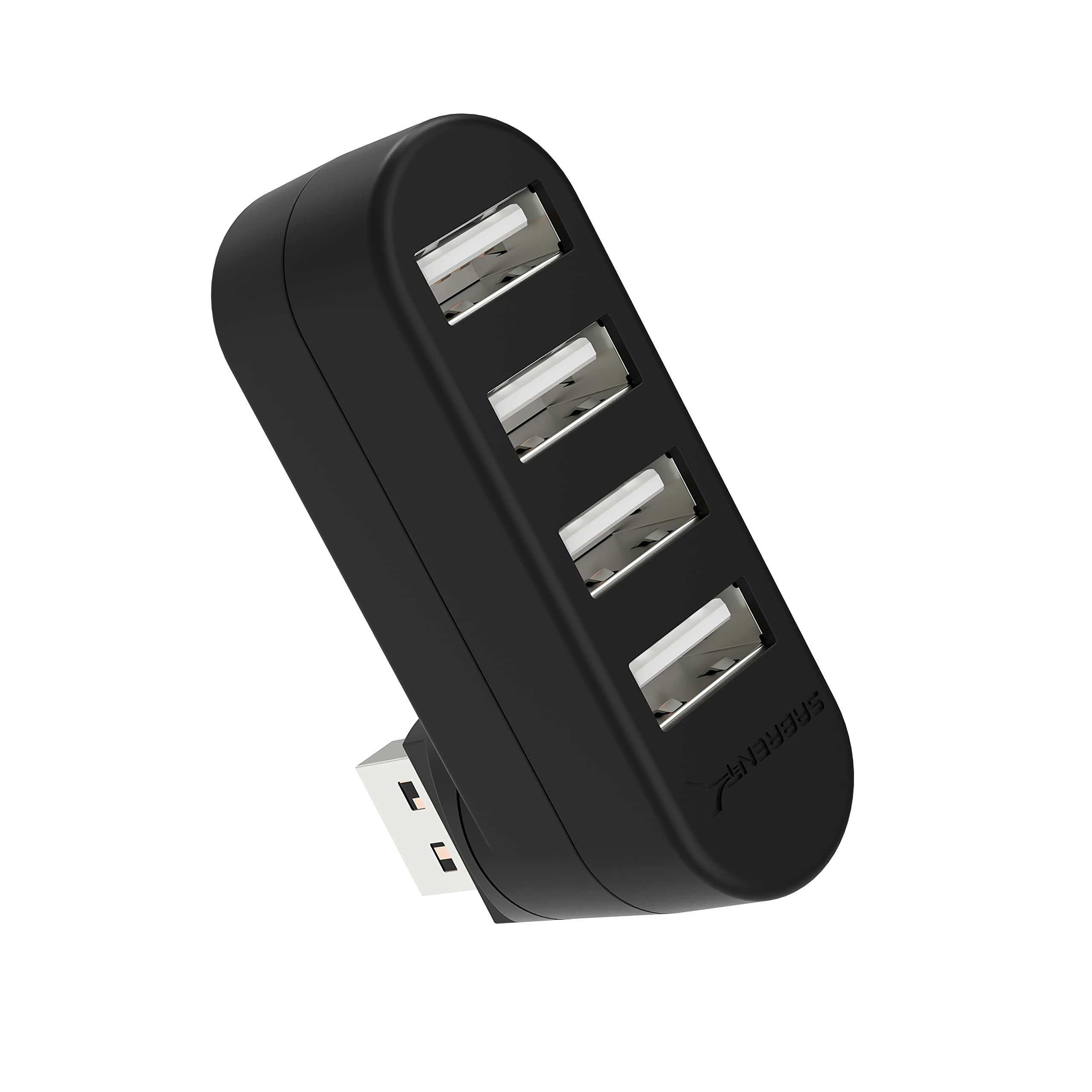
The SABRENT 4 Port USB 2.0 Hub review is for shoppers who need a simple way to connect several USB peripherals through one hub.
Its compact, lightweight design and rotatable connector suit a travel kit or crowded setup, while its USB 2.0 speeds and lack of charging support define its limits.
SABRENT USB Hub Review Summary
The quick verdict
16,000+ ratings
Read Amazon ReviewsSABRENT 4 Port USB 2.0 Hub
A compact option for adding four USB 2.0 connections to a compatible computer, especially when charging and high-speed data are not priorities.
- Four USB 2.0 ports for connecting compatible USB peripherals.
- Data transfer rate up to 480 Mbps.
- USB connector rotates 90 or 180 degrees for flexible orientation.
- Plug-and-play setup with hot-swappable and hot-pluggable operation.

Pros
- Adds four USB connections through a single hub.
- Rotating connector offers options for fitting the hub around a device’s port layout.
Consider before buying
- USB 2.0’s maximum listed transfer rate is limited compared with newer USB standards.
- The hub does not support charging, so it cannot serve as a charging station for connected devices.
Read the full review summary
This hub adds four USB 2.0 ports to a compatible device, with plug-and-play setup and hot swapping for convenient peripheral connections.
The connector rotates 90 or 180 degrees, which can help orient the hub around a computer’s port placement or nearby objects.
Its strongest fit is a basic setup for peripherals such as a keyboard, mouse, or other USB devices that do not need charging from the hub or faster-than-USB-2.0 transfer rates.
Consider a newer, faster hub if external storage speed or charging is part of your plan.
The buying factors
SABRENT USB Hub Scorecard
Editorial scores reflect listed features and buyer fit; they are not laboratory measurements or customer ratings.
Port expansion
Four USB 2.0 ports give a compatible device room for several peripherals.
Port flexibility
The connector rotates to 90 or 180 degrees, offering useful positioning flexibility.
Portability
Its lightweight, compact design is suited to carrying with a laptop.
Setup simplicity
Plug-and-play operation and hot swapping support straightforward everyday use.
Data speed
USB 2.0 supports rates up to 480 Mbps, which is a modest ceiling for large transfers.
Charging utility
Charging is not supported, so it is intended for connectivity rather than powering devices.
Key Features and Specifications of SABRENT USB Hub
- Four USB 2.0 ports for connecting compatible USB peripherals.
- Data transfer rate up to 480 Mbps.
- USB connector rotates 90 or 180 degrees for flexible orientation.
- Plug-and-play setup with hot-swappable and hot-pluggable operation.
- Compatible with Windows, Mac, and Linux systems.
- Compact plastic enclosure measuring 2.3 × 0.7 × 1.7 inches; listed weight is 1 ounce.
- Charging is not supported.
Pros and Cons of SABRENT USB Hub
Pros
- Adds four USB connections through a single hub.
- Rotating connector offers options for fitting the hub around a device’s port layout.
- Small, lightweight form is easy to pack or keep on a desk.
- Simple setup works across Windows, Mac, and Linux systems.
Consider before buying
- USB 2.0’s maximum listed transfer rate is limited compared with newer USB standards.
- The hub does not support charging, so it cannot serve as a charging station for connected devices.
- Check that the host device has a compatible USB port and that the four-port layout suits the peripherals you plan to connect.
Who Should Buy SABRENT USB Hub?
Good fit
Choose this hub if you need extra USB connections for everyday peripherals and value a small, lightweight design. Its rotating connector can be useful when a straight plug would sit awkwardly against a laptop, desktop, or nearby surface.
It is a better match for input devices and routine accessories than for a workflow centered on transferring large files. Confirm that USB 2.0’s up-to-480-Mbps ceiling fits your use, and plan to charge devices separately.
Who should skip it
Skip it if your main goal is charging phones, tablets, or other devices through the hub; charging is not supported. Also consider another model if faster transfers are important to your external-drive workflow.
How the SABRENT USB Hub Fits a Basic Setup
Port expansion for everyday peripherals
Four downstream USB 2.0 ports can reduce the need to swap devices between a compatible computer’s ports.
This is practical for a modest group of peripherals; before buying, count the devices you expect to connect and check their connector types.
A connector that changes orientation
The plug rotates through 90 or 180 degrees, giving you a choice of how the hub sits relative to the host device.
That flexibility may help with tight port placement, though the best orientation depends on the computer and the space around it.
Speed and power expectations
The maximum listed data rate is 480 Mbps, so this is a basic USB 2.0 expansion choice rather than a high-speed storage hub.
Charging is explicitly unsupported, making it important to keep a separate charging solution for devices that need power.
Portability and compatibility
The small plastic body and listed one-ounce weight make the hub easy to carry alongside a laptop.
It is described as compatible with Windows, Mac, and Linux systems; check your device’s available USB connection and operating-system needs before adding it to your setup.
Alternatives to SABRENT USB Hub
USB Hubs alternative

2,000+ ratings
Read Amazon ReviewsSABRENT 4-Port USB 3.0 Hub (HB-MC3B)
Consider the HB-MC3B if you need four ports but want a substantially higher listed transfer-rate ceiling and a separate cable.
The reviewed model is the more suitable fit when its rotating connector and compact form match your setup and USB 2.0 is sufficient.
- This four-port USB 3.0 hub supports data rates up to 5 Gbps and includes a 2.5-foot USB 3.0 cable.
- The reviewed hub provides four USB 2.0 ports, with transfer rates up to 480 Mbps, and its connector rotates.
USB Hubs alternative
6,000+ ratings
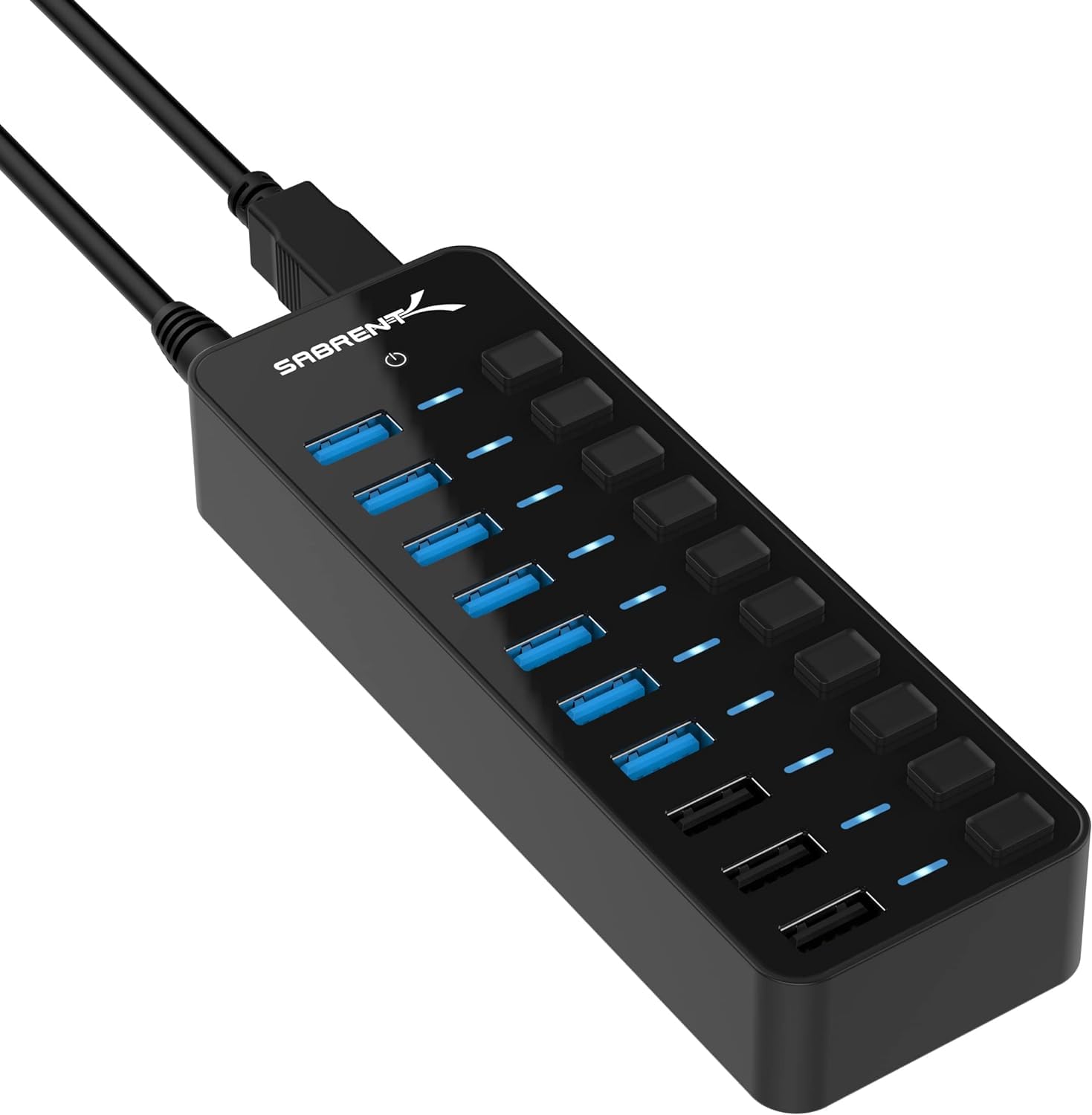
Read Amazon ReviewsSABRENT 10-Port USB 3.0 Hub (HB-B7C3)
Choose the HB-B7C3 if you need a larger desktop setup, charging ports, or per-port controls and are comfortable with a powered hub.
The reviewed model better suits a small, simple expansion need where charging and USB 3.0 are unnecessary.
- The HB-B7C3 connects up to seven USB 3.0 devices, has three dedicated charging ports, individual port switches and LEDs, and includes a 60W power adapter.
- The reviewed model adds four USB 2.0 ports and does not support charging.
Is SABRENT USB Hub Worth It?
The SABRENT 4 Port USB 2.0 Hub is worth considering when the goal is straightforward peripheral expansion in a compact package. Four ports, a rotatable connector, and broad operating-system compatibility make it a practical basic option.
Buy it if USB 2.0 speeds meet your needs and you will charge devices separately. If faster file transfers or charging support are central to your setup, choose a hub built around those requirements.
Your review at a glance
16,000+ ratings
Read Amazon ReviewsSABRENT 4 Port USB 2.0 Hub
A compact option for adding four USB 2.0 connections to a compatible computer, especially when charging and high-speed data are not priorities.
- Four USB 2.0 ports for connecting compatible USB peripherals.
- Data transfer rate up to 480 Mbps.
- USB connector rotates 90 or 180 degrees for flexible orientation.
- Plug-and-play setup with hot-swappable and hot-pluggable operation.