Programmers can spend long stretches at a desk, switching between focused work and creative projects. A thoughtful gift can make their setup more comfortable or add something enjoyable to their off-hours.
These eight ideas cover workspace adjustments, connectivity, sound, and gaming gear. Check current product details and compatibility against the recipient’s equipment before buying.
8 Gift Ideas for Programmers and Their Workspaces
Nulaxy Pull-Out Height Adjustable Laptop Stand

- Adjusts the screen height for sitting or standing desk positions.
- Folds for compact storage when the desk needs to clear.
- Aluminum panel with ventilation holes supports heat dissipation.
Best Gift For: A programmer who alternates between sitting and standing while working at a laptop.

HUANUO FlowLift Single Monitor Mount

- Offers a tilt range for adjusting the screen angle.
- The arm provides several ways to reposition the screen.
- Includes a clamp or grommet mounting option.
Best Gift For: A programmer whose monitor and desk fit the mount’s compatibility requirements.
SABRENT 5-in-1 USB-C Hub
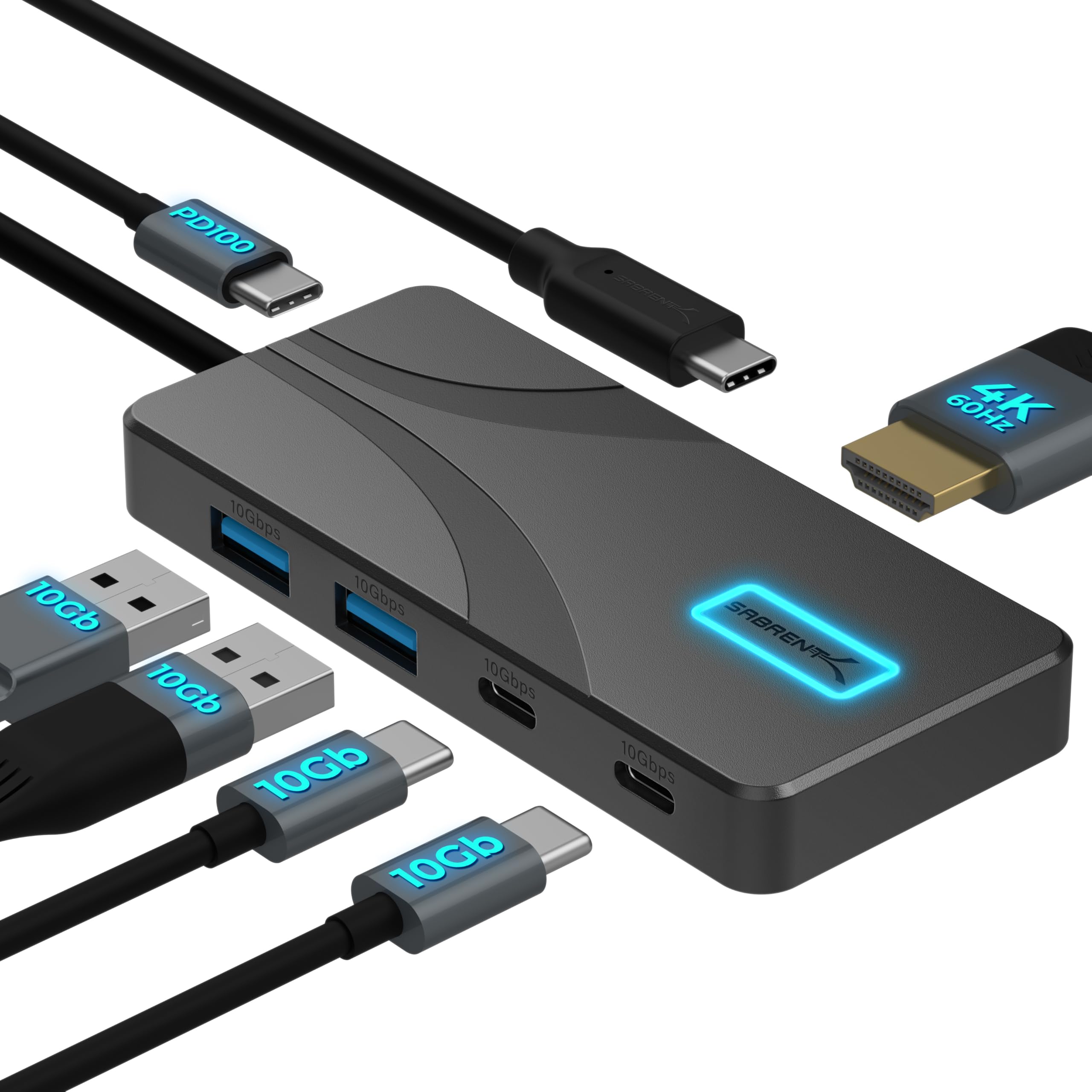
- Connects USB-A and USB-C peripherals through high-speed ports.
- Supports an HDMI display output up to 4K at 60Hz.
- Passes power from a USB-C charger to a laptop.
Best Gift For: A programmer with a compatible USB-C laptop who needs connections for desk peripherals.
TP-Link AXE5400 Tri-Band WiFi 6E Router

- Includes a 6 GHz band for WiFi 6E connections.
- OneMesh support can pair with a compatible extender.
- Supports VPN server and client functions.
Best Gift For: A programmer looking to update a home network for gaming, streaming, and everyday devices.
SteelSeries Apex Pro HyperMagnetic Gaming Keyboard

- Offers 40 levels of adjustable actuation for individual keys, from 0.1 to 4.0 mm.
- Can assign two actions to the same key.
- The display shows information from games and apps.
Best Gift For: A programmer who enjoys PC gaming and wants adjustable keyboard actuation.
Audioengine A2+ Wireless Computer Speakers

- Supports wireless playback from phones, tablets, and computers.
- Connects directly to a computer through USB-C.
- Hand-finished real wood cabinets reduce unwanted resonance.
Best Gift For: A programmer who listens to music, podcasts, or audiobooks at a desk.
FIFINE AmpliGame AM8 USB/XLR Microphone

- Offers USB and XLR connectivity for different audio setups.
- Includes a tap-to-mute control and gain knob.
- RGB lighting can be changed or switched off using its button.
Best Gift For: A programmer who streams, records podcasts, or makes voiceovers.
SteelSeries Aerox 3 Wireless Gaming Mouse

- Connects wirelessly through 2.4GHz or Bluetooth.
- Its holey shell reduces weight to 68g.
- Interiors are shielded from water splashes, dust, and dirt.
Best Gift For: A programmer who games and wants a wireless mouse with Bluetooth connectivity.
1. Choose gifts for programmers around the workday
When considering gifts for programmers, start with the part of the workday that could use a lift. Someone who moves between sitting and standing may appreciate a different desk arrangement, while a person with limited connection options could use a simpler way to attach their everyday devices.
Think about the recipient’s actual workspace before choosing a desk accessory. A laptop stand or monitor mount can be useful when the person has a permanent desk and wants to adjust screen placement; a hub may suit someone who regularly connects peripherals or an external display.
For a programmer working remotely, consider whether they share a room, move between work areas, or use a dedicated home office. A network upgrade may make sense for a household with many connected devices, while desktop speakers or a microphone fit someone who already enjoys listening, streaming, or recording.
2. Balance the budget with what completes the setup
Set a comfortable budget before browsing and think about whether the gift is meant to be a small upgrade or a centerpiece. A connection accessory can be a practical choice, while a larger audio or gaming item may feel more substantial when the recipient has shown interest in that kind of gear.
Some computer accessories depend on the rest of the setup. Before buying a mount, check monitor fit and desk attachment options; for a hub, confirm the computer’s ports and display support.
Those checks can help avoid spending on features the recipient cannot use.
A complete gift does not always need to be a single device. Pair a desk upgrade with a handwritten note about the routine it supports, or combine an audio accessory with a playlist or a few recommendations.
Keep the total within your budget and leave room for any compatible accessories the recipient may need.
3. Personalize gifts for programmers to match their setup
Personalizing gifts for programmers starts with noticing how they use their computer. A gamer may value adjustable controls and a comfortable play space, while someone who records calls or streams may appreciate equipment that fits their audio setup and preferred way of working.
If you are unsure about exact models, ask a friend or family member what the recipient already owns. A discreet photo of the desk can help you check available space, cable connections, and whether a screen accessory would fit.
Consider the recipient’s preferred colors and how much room they have to store equipment.
Presentation can make a practical gift feel more personal. Wrap a desk accessory with a short note naming a specific project or routine you hope it supports.
For speakers or a microphone, add a small card with a favorite album, podcast, or shared listening suggestion, without implying that the recipient needs to change their setup.
4. Make thoughtful picks across gifts for programmers
Use the recipient’s interests to narrow down the options. A programmer who often plays games after work may enjoy a keyboard or mouse, while someone who likes a calmer desk environment could prefer a screen adjustment or audio upgrade.
A network device is a broader household gift, so consider whether others at home would benefit too.
If you are comparing options, check the current price and the product’s full compatibility details. Confirm device operating support, port types, display requirements, desk dimensions, and mounting needs where they apply.
These details matter more than choosing the most feature-rich option for someone whose setup is simple.
Keep the gift proportionate to the relationship and occasion. For a colleague, a practical accessory may feel appropriate; for a close friend or partner, a larger item can work when you know what they want.
A gift receipt or a quick conversation about preferences can help with personal technology purchases.
5. Last-minute buying advice
For a last-minute gift, favor something with a clear use in the recipient’s current setup and verify compatibility before placing an order. Review the product page for dimensions, connections, and any setup requirements, then check the delivery estimate for the recipient’s address and the date you need.
If you cannot confirm a technical detail in time, choose a flexible gift around their interests instead. A digital gift card for a retailer they use, a favorite coffee shop, or a book connected to a hobby can pair well with a note that explains why you thought of them.
When the gift arrives, keep the packaging and receipt until the recipient has had a chance to check it with their equipment. Let them know you checked the details and are happy to exchange it if something does not fit.
That small gesture makes technology easier to give and more comfortable to receive.